Intro
Wazuh already detects SSH brute-force by default. I wrote a custom rule on top of existing rules to learn how rules work in Wazuh. This is my process of taking a failed authentication log line from auth.log, learning how Wazuh uses it to create an alert, building on an existing rule to add a frequency filter, and then verifying the custom rule works.
Failed Authentication Attempts
We will need failed SSH auth attempts to a machine where a wazuh-agent is deployed. (i.e. personal laptop -> macbookpro-ubuntu). We can do this as non-existent user, or as an existing user with the wrong password.
# Run a few times
$ ssh fakeuser@[agent-ip]
or with sshpass:
$ for i in {1..6}; do sshpass -p 'wrongpassword' ssh -o PubkeyAuthentication=no -o StrictHostKeyChecking=no emilio@<agent-ip>; sleep 2; done
Inspecting Auth Logs
Then on the agent that you tried remotely accessing, look for the log line that records the failed password attempt. Copy it.
$ less /var/log/auth.logFind the log line at the end of the file. Mine looked like this:
2026-09-23T16:06:03.160646+00:00 ubuntu-mac sshd[969673]: Failed password for emilio from [laptop-ip] port 59278 ssh2Learning How Alerts Are Generated
Back on the wazuh manager, run wazuh-logtest:
$ sudo /var/ossec/bin/wazuh-logtestPaste the log line you just copied. Note the groups in the output, specifically authentication_failed. That’s what our custom rule will filter for.
**Phase 1: Completed pre-decoding.
	full event: '2026-09-23T16:06:03.160646+00:00 ubuntu-mac sshd[969673]: Failed password for emilio from [laptop-ip] port 59278 ssh2'
	timestamp: '2026-09-23T16:06:03.160646+00:00'
	program_name: 'sshd'

**Phase 2: Completed decoding.
	name: 'sshd'
	parent: 'sshd'
	dstuser: 'emilio'
	srcip: '[laptop-ip]'
	srcport: '59278'

**Phase 3: Completed filtering (rules).
	id: '5760'
	level: '5'
	description: 'sshd: authentication failed.'
	groups: '['syslog', 'sshd', 'authentication_failed']'
	firedtimes: '4'
	gdpr: '['IV_35.7.d', 'IV_32.2']'
	gpg13: '['7.1']'
	hipaa: '['164.312.b']'
	mail: 'False'
	mitre.id: '['T1110.001', 'T1021.004']'
	mitre.tactic: '['Credential Access', 'Lateral Movement']'
	mitre.technique: '['Password Guessing', 'SSH']'
	nist_800_53: '['AU.14', 'AC.7']'
	pci_dss: '['10.2.4', '10.2.5']'
	tsc: '['CC6.1', 'CC6.8', 'CC7.2', 'CC7.3']'
**Alert to be generated.
Writing the Custom Rule
Write the custom rule in /var/ossec/etc/rules/local_rules.xml (see below).
<group name="local,">
  <rule id="100100" level="10" frequency="5" timeframe="120">
    <if_matched_group>authentication_failed</if_matched_group>
    <same_source_ip />
    <description>Custom: SSH brute force attack, multiple failures from same source.</description>
    <group>authentication_failures,</group>
    <mitre>
      <id>T1110</id>
    </mitre>
  </rule>
</group>
This rule looks for event logs that have the group authentication_failed, which catches two rules relevant to this exercise: 5760, failed SSH authentication from a known user, and 5710, failed SSH authentication from an unknown/non-existent user. If you ran ssh fakeuser@[agent-ip] instead of the sshpass command, you would have seen rule ID 5710. It has an ID of 100100 and triggers when a log event with group authentication_failed happens at least 5 times within a two-minute timespan from the same IP (see `<same_source_ip /> in the XML snippet).
Restart wazuh-manager for the rule changes to take effect.
sudo systemctl restart wazuh-managerVerification
Run wazuh-logtest again and enter the log line 5+ times and you should see the custom rule pop up.
To watch the alert pop up in the Wazuh dashboard, generate some real traffic from a device on the LAN:
$ for i in {1..6}; do sshpass -p 'wrongpassword' ssh -o PubkeyAuthentication=no -o StrictHostKeyChecking=no emilio@<ubuntu-ip>; sleep 2; doneIn the dashboard navigate to the logs view with: hamburger menu > threat intelligence > threat hunting > events. Filter the logs for the rule ID (100100) by clicking the ”+ Add Filter” button.
- Field: rule.id
- Operator: is
- Value: 100100
Voilà!
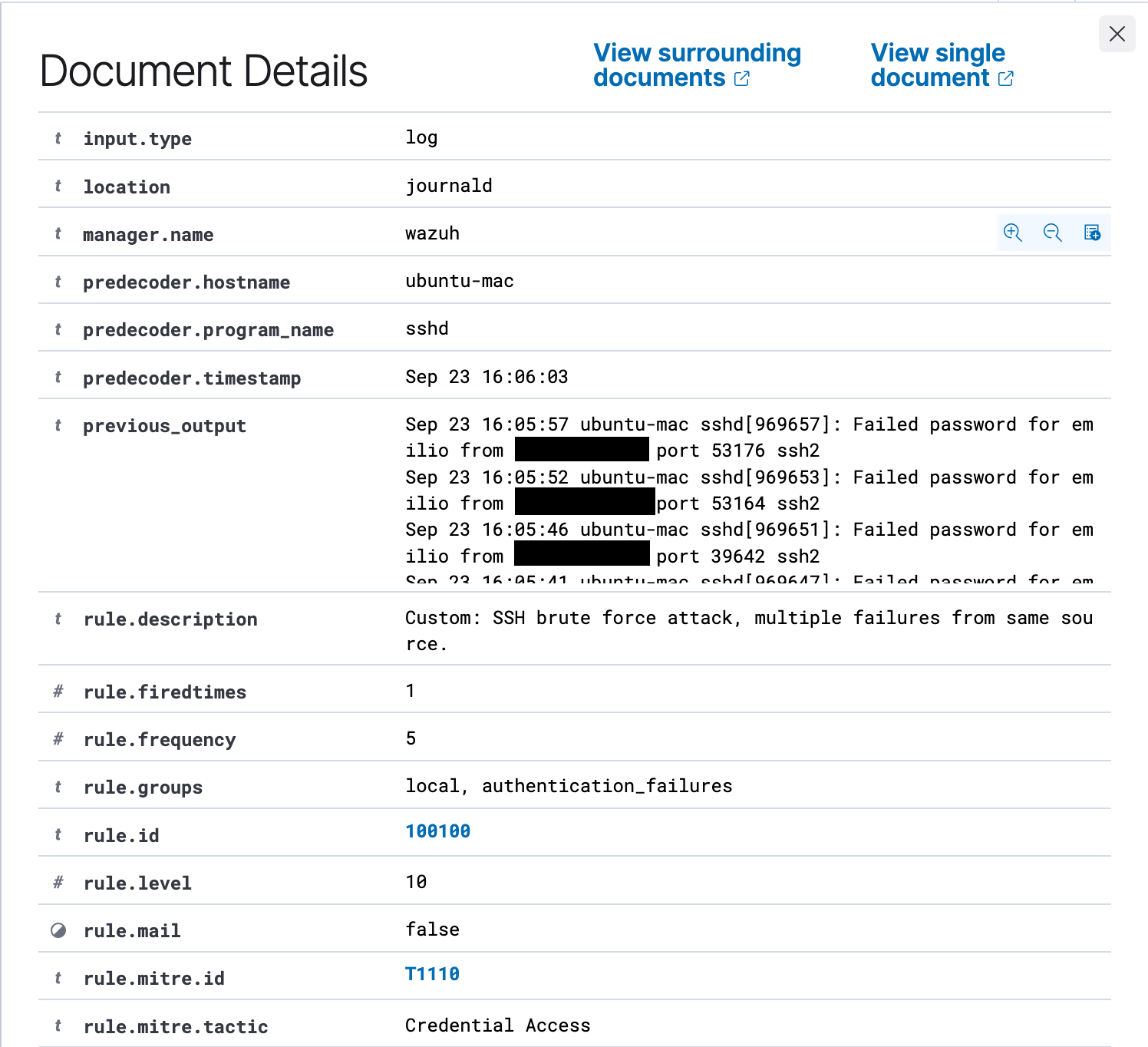
Rule 100100 is live on the manager now and watching every enrolled agent. Five failed logins from one IP inside two minutes produces an alert based on the custom rule.
One thing worth noting that confused me during this process is when the alert fires, the dashboard tags it with your rule’s own group name (<group>authentication_failures</group>) and the authentication_failed group that triggered the rule appears nowhere in the alert. The filter <if_matched_group> looks for the group authentication_failed but displays the alert under the group specified in the rule, <group>authentication_failures</group>.
Next I plan to write another rule that builds on this by detecting a successful login from the same IP after being flagged for brute-force patterns like the rule I just made, which would indicate a potential breach.